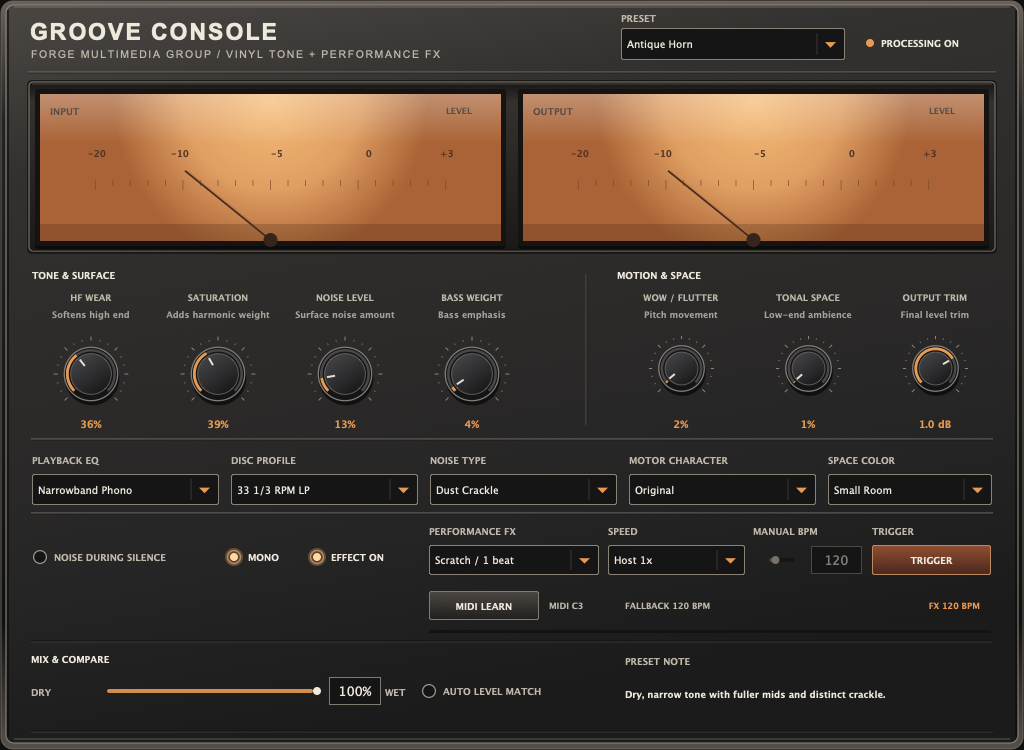
The browser preview plays one fixed track with simplified controls and does not demonstrate the installed Recall gestures. The $19 Mac early-access beta requires Apple Silicon and macOS 27 or later; Windows and Linux are separate $19 betas.
Five decisions in the session
Build the color, then the move.
01
Choose the moment
Start with a drum loop, keys, or a transition that needs a change of scene. Place the processor where you can compare the treated passage with the surrounding mix. A short, deliberate moment often communicates more than coating every track.
02
Set playback color
Load a starting profile such as Warm LP for gentler color or Grimy Break for deliberate grit. The preset does not lock the controls: adjust tone, saturation, and bass weight to fit the source rather than the preset name.
03
Add surface separately
Choose the texture and raise its level until it is audible in context. Groove Console can run surface sound continuously or only while input audio is present. Use the latter when silence needs to stay silent.
04
Time the gesture
In the installed macOS early-access beta (0.22.2), Recall can follow the host tempo or a manual BPM. For a concrete starting point, set a Logic Pro session to 120 BPM, choose Host 1x, and trigger Brake Stop / 4 beats across a four-beat transition. The installed Mac walkthrough shows that setting alongside the other five gestures using a beat created for the demonstration.
05
Compare at a fair level
Use Mix to hear the processed signal against the original, then use Auto Level Match and Output Trim before deciding. A louder signal can seem better for the wrong reason. Groove Console’s Mono check sums the processed signal only; a dry blend or bypass stays stereo.
Hear what each example actually shows
Two ways to listen.
Fixed-track browser preview
Try the color yourself.
Play one 32-second track, compare Original with Processed, and adjust presets and the available tone and surface controls. This is a simplified browser tool, not the plug-in installer or a demo of its Recall gestures.
The FORGE walkthrough demonstrates the actual macOS Audio Unit and its six Recall gestures. It is a Mac demonstration; it does not establish feature parity with the separate Windows and Linux betas.
Groove Console interface. The browser preview has a smaller control set than the installed plug-in.Availability / separate editions
Match the edition to your system.
The sold Apple Silicon Mac early-access beta (0.22.2) requires macOS 27 or later and includes Audio Unit, VST3, and standalone formats in a signed, Apple-notarized DMG. Windows and x86-64 Linux are separate beta purchases with their own limitations; the Mac walkthrough does not demonstrate them.
Each operating-system edition costs $19 through Gumroad. Review the current requirements and beta notes before buying. The browser preview is free and does not include an installer.