Change the texture.
Mark the phrase.
A practical way to audition record-inspired tone, surface, and one Recall gesture at a phrase boundary in the installed Mac plug-in.
This guide uses the Apple Silicon Mac beta in Logic Pro. The separate browser preview compares sound on one fixed track and does not show the installed Recall workflow.
See the controls in Logic Pro.
The FORGE walkthrough shows Groove Console 0.22.2 running in Logic Pro on a FORGE-created beat at 120 BPM. The visible interface shows the preset, tone and surface controls, a Performance FX selection, Host 1x speed, and a Trigger button. The published walkthrough selects and triggers six tempo-aware Recall gestures: Scratch / 1 beat, Rewind / 2 beats, Quick Cut / 1/2 beat, Chirp / 1 beat, Backspin / 2 beats, and Brake Stop / 4 beats.
The video is a demonstration of the installed Mac Audio Unit, not a recording of the browser preview. It does not establish the same controls in the separate Windows and Linux betas.
Build a change you can place.
Choose a phrase boundary
Pick the end of a musical phrase where a change in texture would support the arrangement. Keep the surrounding passage available for comparison.
Choose and shape a profile
Start from one of the nine editable profiles. Adjust playback tone and surface texture while listening to your own source, then compare the result with the original at a fair level.
Audition a Recall gesture
Match Groove Console to the Logic session tempo, select a gesture in Performance FX, and use the visible Trigger control at the chosen boundary. The walkthrough uses 120 BPM and Host 1x as one example; your song can use its own tempo. Listen in context and choose the gesture that fits the phrase.
For a focused four-beat Brake Stop example, see the existing vinyl texture and stop guide.
Hear the browser preview.
The one-track browser preview lets you compare Original and Processed sound and adjust a smaller set of tone and surface options. It is useful for a quick sound check. It is not the installed Logic Pro interface and does not demonstrate the six Recall gestures.
Open the one-track browser preview ↗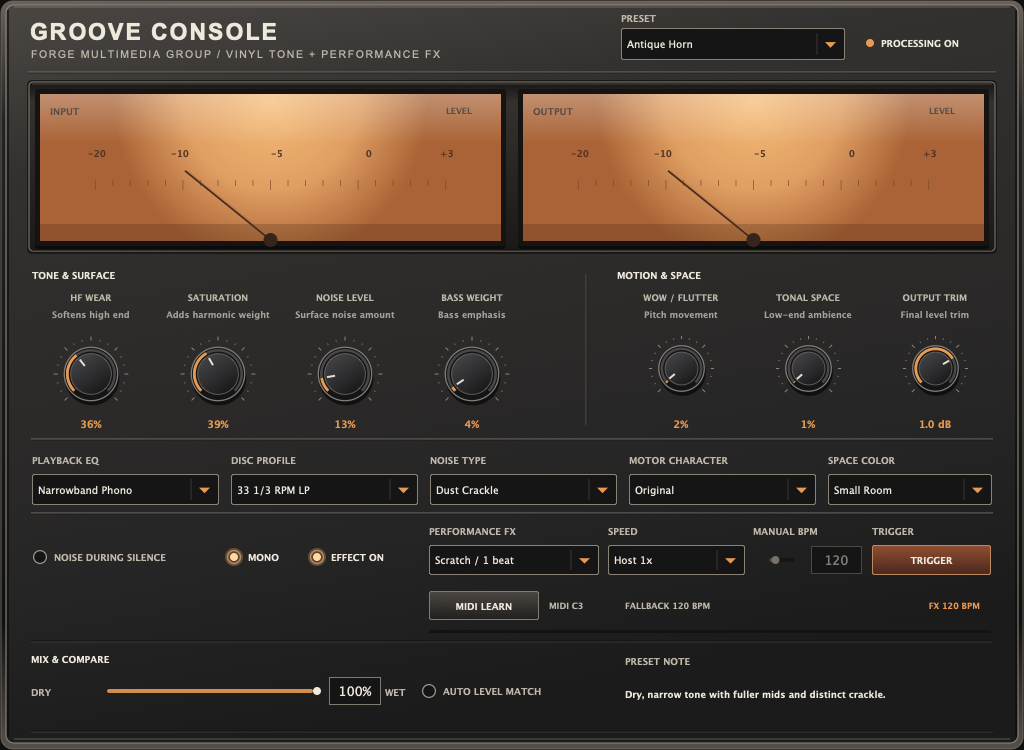
Check the edition before buying.
The Apple Silicon Mac edition is a separate $19 early-access beta requiring macOS 27 or later. It includes Audio Unit, VST3, and standalone formats. Windows and Linux are separate older beta purchases; the Logic Pro walkthrough is a Mac demonstration and does not establish feature parity with them.